Facts & FAQ
ReflowPDF,
in plain facts.
Short, checkable answers about what the app does, what it doesn't, what it costs and where your documents go.
Checked against ReflowPDF 1.5, the current App Store version, on November 25, 2026.
An original demonstration document.
The short version.
| Topic | Fact |
|---|---|
| What it is | An iPhone and iPad app that recognizes text in scanned PDFs on the device and shows it as reflowed, adjustable text in Reader Mode. |
| Devices | iPhone and iPad with iOS 26 or iPadOS 26 or later. |
| Price | Free download. Three standard documents of up to 50 pages each are fully processed free. The Lifetime unlock is a one-time purchase: US$4.99 in the United States, with prices varying by country or region. No subscription. |
| Lifetime adds | Unlimited documents, documents of any length, and TXT and searchable PDF export. |
| Text recognition | Runs on the device with Apple's Vision framework. English, Simplified Chinese, Traditional Chinese, Japanese (including vertical text) and Korean. |
| Import | PDFs from Files or the Share Sheet, page images from Photos, and paper pages scanned with the camera. |
| Reading | Font size, typeface, line spacing and theme; search; bookmarks; heading navigation; saved reading progress; jump from any paragraph to its original page. |
| Privacy | Documents and recognized text are not uploaded. No account, in-app analytics, advertising or tracking. |
| Offline | Text recognition and reading work without a network connection. |
| App languages | English, Japanese, Korean, Simplified Chinese and Traditional Chinese. |
| Developer | NOVA BAY STUDIO LLC |
This website uses Cloudflare Web Analytics, which does not use cookies. Details are in the Privacy Policy.
What ReflowPDF does not do.
- It is a reader, not a PDF editor. It does not change page content, sign documents or fill in forms.
- It does not convert a PDF into a Word document or an EPUB ebook. Reader Mode is a reading view, and the original file is kept.
- Formulas, complex tables, illustrations, footnotes and pages with several columns can be recognized incorrectly or put in the wrong reading order.
- Recognition accuracy depends on scan quality, language and page layout. We do not publish an accuracy figure, so check important names, numbers and quotations against the original page.
- Documents in languages other than the five listed above are not supported at this time.
- There is no Android, Windows or web version.
Frequently asked.
What is ReflowPDF?
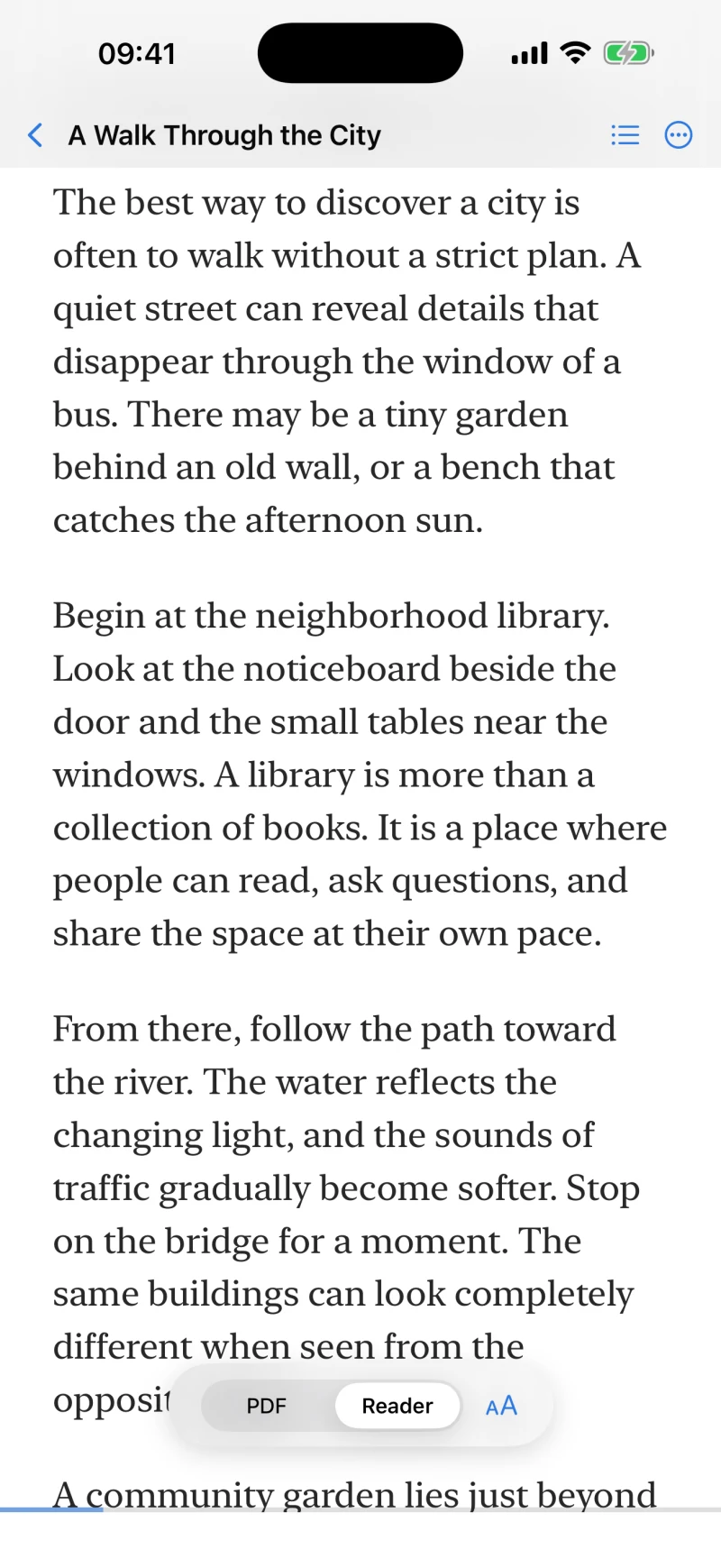
An iPhone and iPad app for reading scanned PDFs. It recognizes the text on scanned pages on your device, then shows it in Reader Mode, where lines wrap to fit the screen and you can change the font size, typeface, line spacing and theme. The original PDF stays one tap away.
How do I read a scanned PDF on iPhone without zooming and panning?
Import the PDF into ReflowPDF from Files or the Share Sheet, start text recognition, then switch to Reader. The recognized text wraps to the width of your screen, so you scroll down instead of moving sideways. Any paragraph can jump back to its original page. The step-by-step guide shows each screen.
Is ReflowPDF free?
The download is free, and the free version fully processes three standard documents of up to 50 pages each. For a longer document, it can process the first 30 pages as a preview. A one-time Lifetime unlock removes the document limits and adds TXT and searchable PDF export. It costs US$4.99 in the United States; prices vary by country or region. There is no subscription.
Are my documents uploaded?
No. Text recognition and document processing run on your iPhone or iPad, and your PDFs and recognized text are not uploaded. The app has no account, in-app analytics, advertising or tracking.
Does it work offline?
Yes. Text recognition and reading run on the device and do not need a network connection. Buying or restoring the Lifetime unlock goes through the App Store.
Which languages can it recognize?
English, Simplified Chinese, Traditional Chinese, Japanese and Korean, including vertical Japanese text. The app detects the document language automatically. Other document languages are not supported at this time. For Japanese scans, see the 日本語ガイド.
Does it work with PDFs that already contain text?
Yes. Text-based PDFs can be read in Reader Mode too, not only scans.
Can I import photos or scan paper pages?
Yes. Besides PDFs from Files and the Share Sheet, you can import page images from Photos or scan paper pages with the camera.
What can I export?
With the Lifetime unlock, you can export the recognized text as a TXT file, or create a searchable PDF that keeps the original pages and adds a text layer. Without it, you can still copy a paragraph in Reader Mode. See how to make a scanned PDF searchable and how to copy a paragraph.
Does it require Apple Intelligence?
No. Text recognition and Reader Mode work without it. An optional summary uses Apple Intelligence on supported devices and also runs on the device.
What does it not handle well?
Formulas, complex tables, illustrations, footnotes and pages with several columns can be recognized incorrectly or put in the wrong reading order. Accuracy depends on scan quality, language and page layout, so check important names, numbers and quotations against the original page.
Where can I get it?
On the App Store, for iPhone and iPad with iOS 26 or iPadOS 26 or later.